CloudBridal v25.12.1: Staff Signatures, Audit Logs, and Flexible Scheduling
We're excited to announce CloudBridal v25.12.1, featuring enhanced document signing with staff signatures, comprehensive change tracking with audit logs, and powerful scheduling flexibility. Here's what's new:
View complete 2025 release notes →
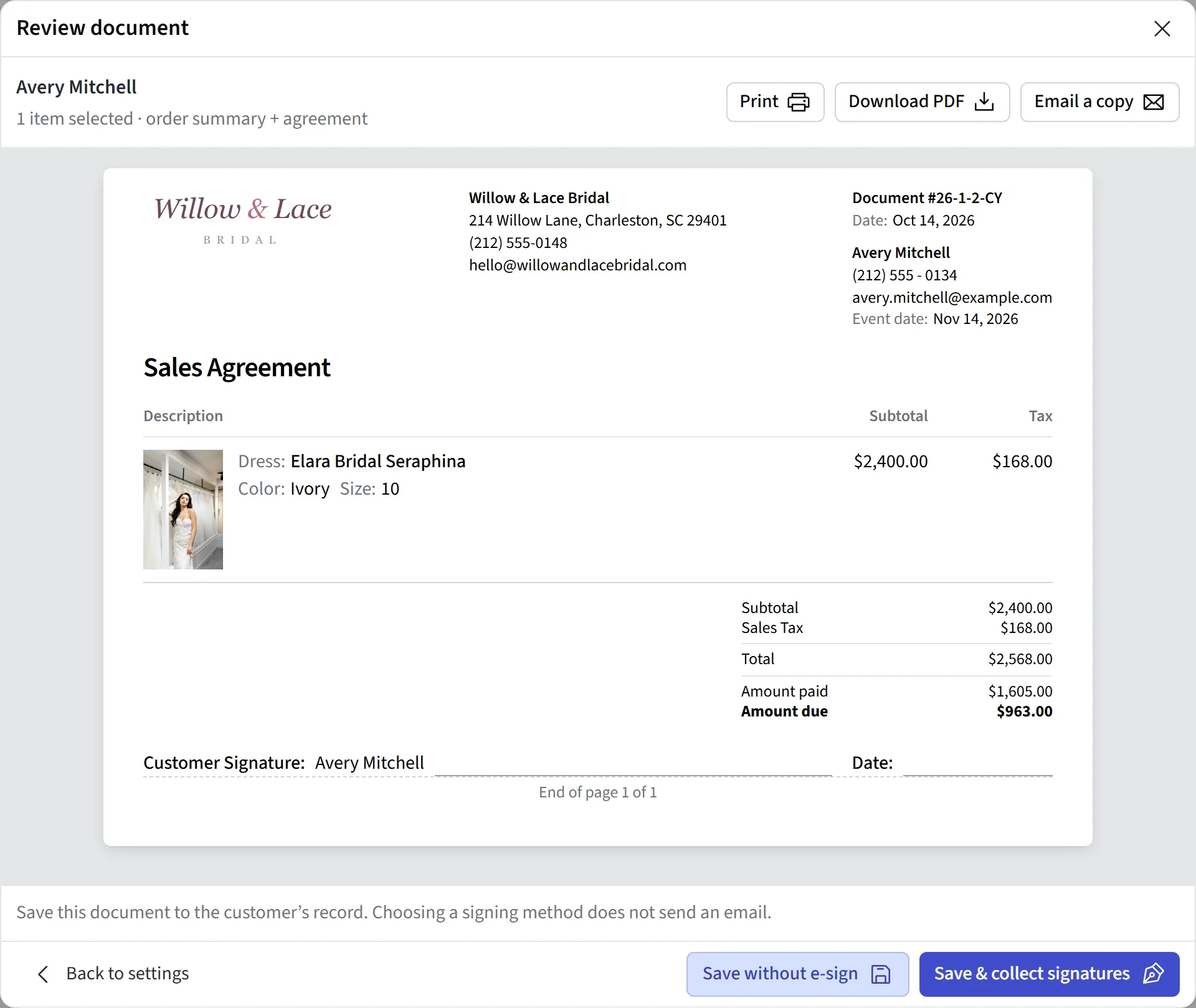
✍️ Staff Member Signatures on Documents
Order documents can now capture both customer and staff member signatures, providing complete accountability for every agreement.
What's New:
- Dual Signature Collection: Documents that require signatures can now collect both customer and staff member signatures in sequence
- Easy Setup: Enable Collect Staff Member Signature in your Docs & Agreements settings
- Customizable Labels: Optionally customize the signature labels (e.g., "Consultant Signature" or "Sales Associate")
Key Benefits:
- Ensure accountability with documented staff acknowledgment
- Create a more professional and complete signing experience
📋 Comprehensive Audit Logs
CloudBridal now captures detailed change history for key entities, giving you complete visibility into who changed what and when.
What's Tracked:
- Customers: Profile updates, contact changes, and account modifications
- Orders: Status changes, pricing adjustments, and item updates
- Payments: Payment modifications and refund records
- And more: Many key business entities now support audit logging
How to Access:
- Look for the View Change History button in the header area of supported records
- View the staff member who made each change
- See the previous and current values for modified fields
- Track the exact date and time of each change
Permissions:
- Audit logs are visible to admin users by default
- Enable access for other roles via the Audit Logs permission in Staff Member Settings
Note: This feature captures changes going forward and does not apply retroactively to historical data.
📅 Per-Day Schedule Overrides
Gain complete control over your appointment availability with the ability to override schedules for specific dates.
What's New:
- Manage Day Feature: Click the Manage Day area on any date in the Appointment Calendar to customize that specific day
- Flexible Overrides: Update hours, close specific fitting rooms, or add/remove appointment capacity for individual dates
- Perfect for Events: Easily accommodate special events, trunk shows, or holiday schedules without changing your regular availability
- Resource-Level Control: Modify capacity for specific resources (fitting rooms) independently
Use Case Examples:
- Extend hours for a trunk show weekend
- Temporarily close a fitting room for maintenance
- Add extra appointment slots for a bridal fair
- Reduce capacity during staff training days
📊 New Report: Slow Moving Inventory
Identify underperforming inventory items with the new Slow Moving Inventory report, now available in the Reports tool.
Key Metrics:
- Days Available: How long each item has been in inventory
- Sales Per Month: Normalized sales velocity to compare items fairly
- Days Since Last Sale: Quickly spot items that haven't moved recently
- Recent Activity: Track sales within the last 90 days
- Value on Hand: Understand your investment in slow-moving stock
Benefits:
- Make informed decisions about markdowns and promotions
- Identify items to feature in sales events
- Optimize your inventory investment by addressing slow movers
👤 Enhanced Customer Referral Tracking
Capture referral sources more accurately with the new "Other" referral type option.
What's New:
- A catch-all "Other" option is now automatically available when selecting referral types
- When "Other" is selected, a text field appears for entering specific details
- Works for both customer-facing forms and staff-entered data
Benefits:
- Capture referral sources outside your predefined list
- Gain insights into new marketing channels you may want to add
- Never lose attribution data due to missing options
💰 Outstanding Balances Dashboard Improvements
The Outstanding Balances dashboard now groups information by customer for better organization.
What's New:
- Customer Grouping: See all of a customer's outstanding orders together in one expandable row
- Customer Totals: View aggregate amounts owed per customer
- Drill-Down View: Expand any customer to see individual order details
- Export Support: Download grouped data for reporting
🗓️ Additional Improvements
Stripe Refund Support:
- You can now initiate refunds for Stripe-processed order payments directly in CloudBridal. Previously, this required initiating the refund through the Stripe dashboard.
Thermal Receipt Printer Logo Support:
- Enable logo printing on thermal receipts in your Payment Settings
- Uses your existing store logo, automatically optimized for thermal printer resolutions
Document E-Signature Notifications:
- When a customer signs a document via email or link (instead of in-store), the store now receives an in-app notification and email notification
- Never miss an important signature and follow up promptly with customers who complete their paperwork remotely
Fitting Room Management:
- Mark appointment fitting rooms as inactive in Appointment Settings to clean up rooms that are no longer in use
Customer Portal Control:
- Disable a specific customer's access to the client portal directly from their profile
Smart Field Date Buffers:
- Date-based smart fields now support adding a buffer in days
- Example: If an order's expected arrival date is 1/1, you can communicate 1/8 to customers while keeping 1/1 in your records
- Configure via the Smart Fields button in any supported rich text editor
Payment Plan Flexibility:
- Set a custom initial deposit percentage for payment plans beyond the standard 25%, 33%, or 50% options