CloudBridal v26.3.1: Custom Reports, Task Automation, and Enhanced Client Portal
We're excited to announce CloudBridal v26.3.1, featuring a completely redesigned reporting experience with saved custom reports, powerful task automation, order adjustments, and a refreshed client portal experience. Here's what's new:
View complete 2026 release notes →
📊 Custom Reports & New Analytics
Plan Requirement: Ultimate
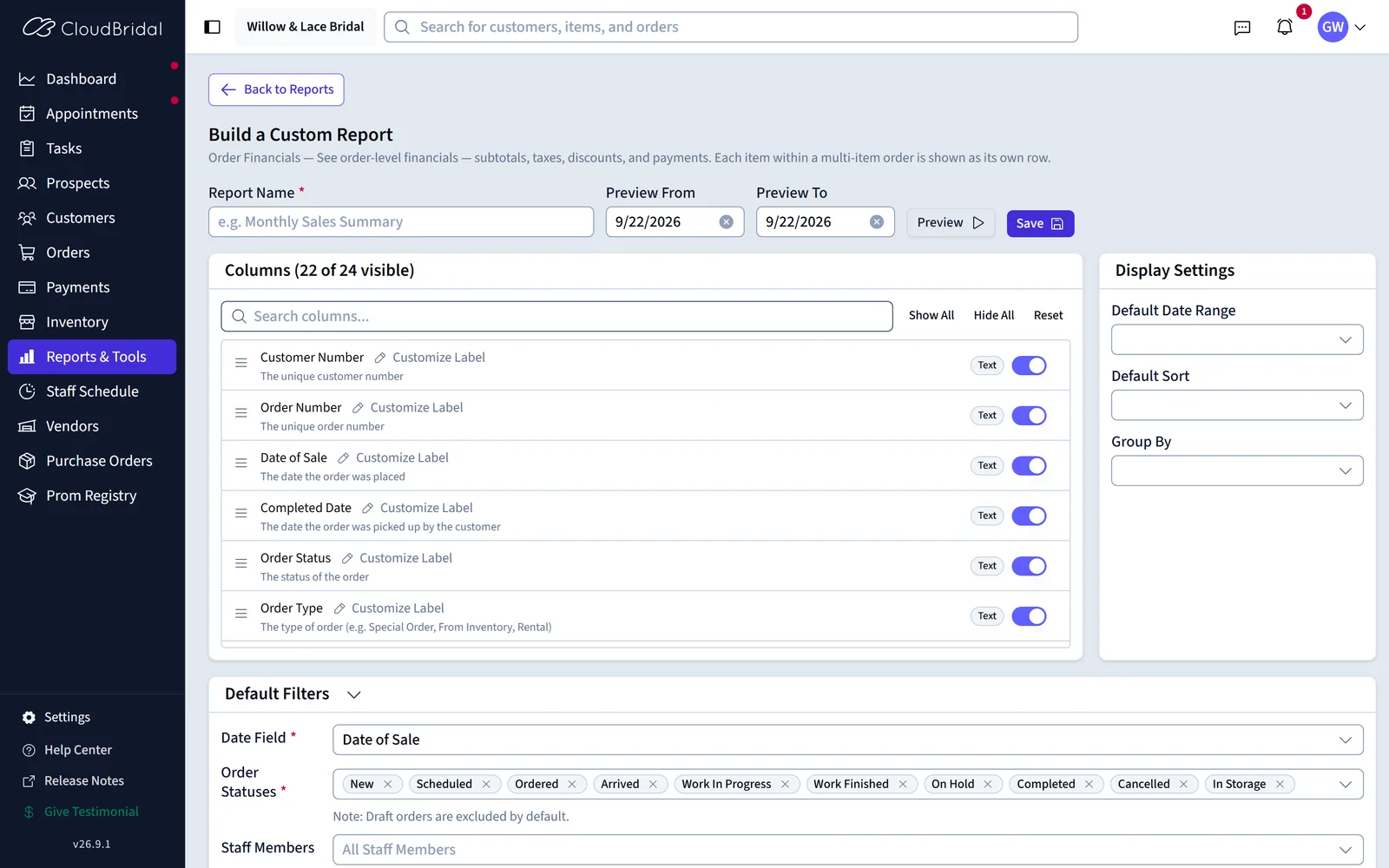
The Reports tool has been completely redesigned to give you more control over how you view and analyze your data. You can now save custom report configurations and access powerful new analytics.
What's New:
- Save Custom Reports: Create personalized versions of any report by customizing which columns are visible, how data is sorted and grouped, default filters, and date presets. Save these configurations for quick access anytime.
- Editable Columns: Show or hide columns, reorder them, and choose exactly the data points you care about for each report.
- Four New Reports: Cash Flow Summary, Task Completion Analytics, Sales Patterns, and Open Orders — providing deeper insights into your business performance.
- Conversion Tracking Drill-Down: Click on metrics in the Appointment Conversion Tracking report to see detailed appointment and order lists. Now includes order attribution to see which appointments led to sales.
Key Benefits:
- Stop re-configuring reports every time — save your preferred view once and reuse it
- Get deeper insights with new report types covering cash flow, task performance, and sales trends
- Understand your appointment-to-sale pipeline with conversion drill-downs
How to Access:
- Navigate to Reports and click the settings icon on any report to customize columns and save your configuration
⚙️ Automated Task Creation
Plan Requirement: Ultimate
Task templates can now automatically create tasks when key events happen in your store — no manual effort required. Choose between instant triggers that fire when a record is created or updated, or scheduled triggers that fire a set number of days before or after important dates like a customer's wedding day or an order's expected arrival.
What's New:
- Instant Automation: Automatically create tasks when a customer, order, appointment, or payment is created or updated.
- Scheduled Automation: Create tasks based on important dates — for example, create a "Confirm final fitting" task 30 days before a customer's event date, or a "Follow up on delayed order" task 7 days after an expected arrival date.
- Condition Matching: Set conditions to control when automated tasks are created — filter by customer category, customer type, order type, item type, vendor, appointment type, payment method, and more.
- Smart Deduplication: The system prevents duplicate automated tasks from being created for the same event.
Key Benefits:
- Eliminate manual task creation for routine follow-ups
- Ensure consistent workflows across your team
- Never miss a critical follow-up action after a sale, appointment, or payment
How to Access:
- Go to Settings > Task Management to manage task templates
- Edit a template and configure the Automation tab to set up automatic task creation
- See Task Automation Recipes for example workflows tailored to bridal boutiques
👰 Client Portal Improvements
Your customers' self-service experience just got better with a refreshed layout, enhanced order views, and expanded appointment booking.
What's New:
- Refreshed Layout: The portal has a cleaner, more compact design with a streamlined welcome area and improved navigation between sections.
- Richer Order Details: The portal's order view has been completely rebuilt. Each order now displays detailed item information including add-ons, alterations, additional work, additional fees, and customer-facing notes. Financial details are clearer with explicit dollar amounts for what's been paid and remaining balance per order, instead of just a percentage.
- Expanded Appointment Booking: Returning customers can now book appointment types through the portal that were previously restricted to first-time customers only, giving your existing clients access to more of your appointment options.
Key Benefits:
- A cleaner, more streamlined portal experience for your customers
- Customers get a clear picture of what they owe, what's been paid, and what each order includes — reducing payment-related questions
- Returning customers have access to your full range of appointment types, not just returning-customer options
📝 Document Email Customization
When emailing generated documents — like order receipts or quotes — you can now customize the email subject and body for each document template.
What's New:
- Per-Template Email Configuration: Each document template now has an Email tab where you can set a custom subject line and email body.
- Smart Field Support: Use dynamic placeholders (customer name, order details, etc.) in your email content for personalized messaging.
- Consistent Branding: Craft professional, on-brand emails that match the tone of each document type.
How to Access:
- Go to Settings > Docs & Agreements, edit a document template, and navigate to the Email tab
🗓️ Additional Improvements
Order Adjustments:
- When you change financial details (subtotal, tax, discount, alteration price, etc.) on an order, CloudBridal now creates an adjustment record that preserves the original values alongside the changes. You can view the full adjustment and refund history in the new Adjustments tab on any order. Adjustments are recorded with their own dates, keeping your financial period reports accurate.
Task Linking to Appointments & Payments:
- Tasks can now be linked to appointments and payments in addition to customers and orders. This provides more context for your team when managing task workloads.
Reference Number Starting Points:
- You can now configure custom starting points for auto-generated reference numbers (Customer #, Order #, Payment #, Purchase Order #) in Settings > Configurations. This is useful when migrating from another system and want to continue your existing numbering sequence.
Pre-Registration Form Streamlining:
- The customer pre-registration form has been streamlined to avoid collecting duplicate information. Fields that are already known from the appointment booking are pre-populated automatically.
QuickBooks Tax Code Mapping:
- Stores using the QuickBooks integration can now map CloudBridal tax rates to QuickBooks tax codes, ensuring accurate tax handling in your synced invoices. You can also configure a non-taxable code for tax-exempt items.
Dashboard Alert Improvements:
- Dashboard alerts now support direct order resolution — click on an order-related alert to open the order directly and take action without navigating away.