CloudBridal v26.10.1: A New Home, a Scheduling Assistant, and Reworked Orders
We're excited to announce CloudBridal v26.10.1, the biggest update of the year. The app has a calmer, more consistent look, so some screens will look different the first time you open them. Home now starts your day with what's booked and what needs attention, a new scheduling assistant shows where an appointment fits as you book it, and follow-ups can have a date. Here's what's new:
View complete 2026 release notes →
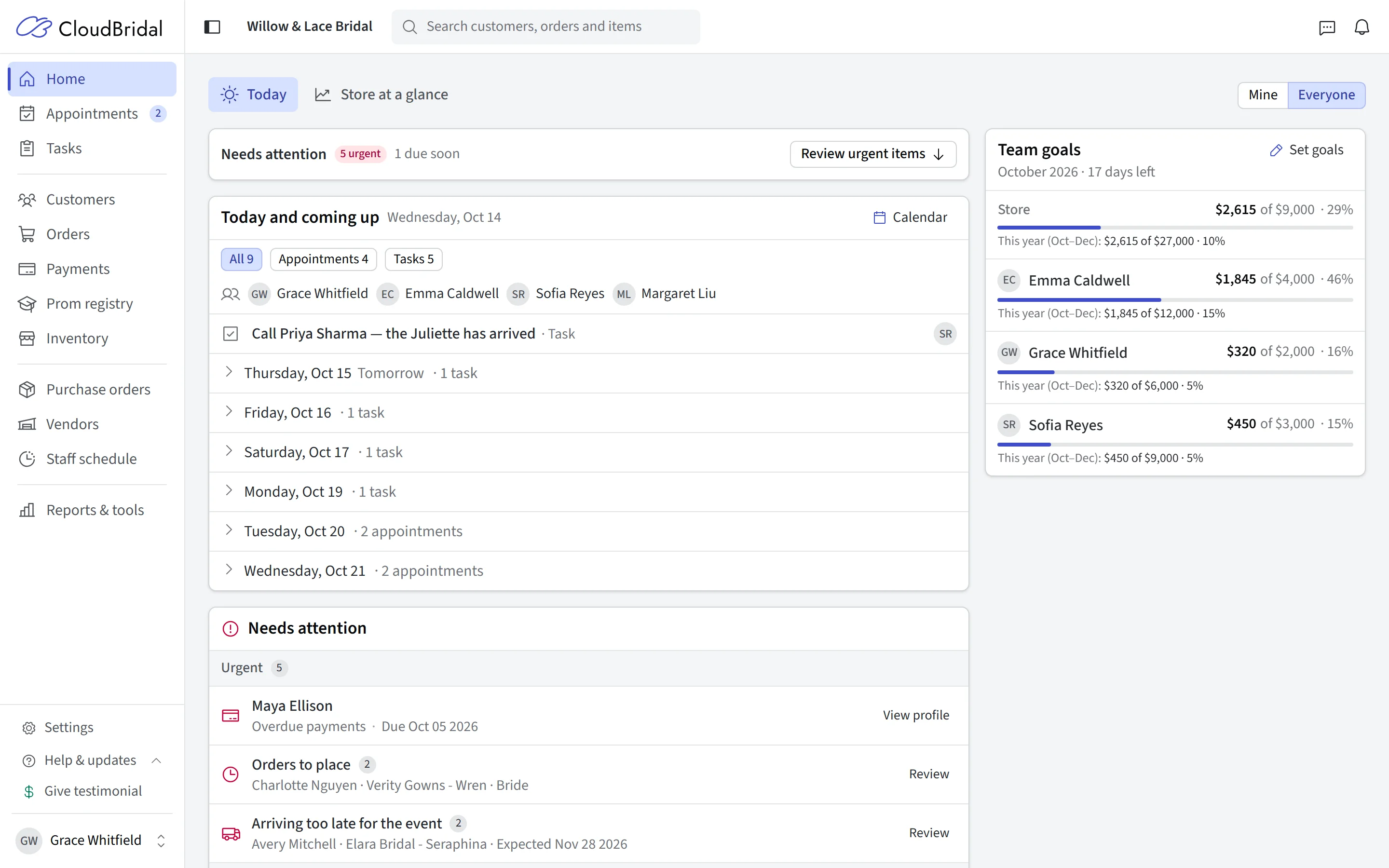
🏠 A Home Built Around Today
Home is where every staff member starts the day: what's booked, what's due and what needs someone's attention.
What's New:
- Today and coming up: See today's appointments and tasks, and what's coming up over the next week. Show just your own, or the whole team's.
- Needs attention: Everything that needs someone is sorted into Urgent, Due soon and Tidy up, so the most pressing things come first.
- New alerts: Get warned about orders arriving too late for the event, overdue stock purchase orders, rentals due back, gowns picked up with money still owing, follow-ups due and texts that didn't arrive. Choose your alerts in Store alerts.
- Close out past events: Mark every open order from events that are already over as picked up, in one go.
- Store at a glance: Your store's figures are on a separate view that only staff you allow can see.
🎯 Monthly Sales Goals
Give each stylist a monthly sales goal and see how everyone is tracking, without a spreadsheet.
What's New:
- Set goals: Give each stylist a monthly sales goal from Set goals on Home.
- Progress on Home: See how the store and each stylist are tracking this month and this year.
- Goals in the staff report: The Staff member sales report shows each person's progress against their goal.
- Count what matters: Count only the item types you care about, like gowns.
- Stylists see their own: Let each stylist see their own goal on Home, or keep goals for the owner and managers.
Note: Sales goals are part of the Core plan and up.
📅 Book Appointments With the Scheduling Assistant
When you book an appointment, the scheduling assistant shows on the calendar where it can go.
What's New:
- Pick the type first: Choose the appointment type and the calendar highlights the times you can book it, in the rooms it uses.
- Preview before you book: Point at a time to see the appointment in place, and drag it to adjust.
- The same on a customer's page: Booking from a customer's profile uses the same assistant.
- Charge a saved card: For appointments that charge at booking, use one of the customer's saved cards or enter a new one.
- Booking requests: Online bookings waiting for your approval are listed right on the calendar.
👥 Customers and Follow-Ups
Keep track of who to call back, and when.
What's New:
- Dated follow-ups: Give a follow-up a date and a note ("loved two gowns, call Tuesday").
- Today's call list: See who to contact today under Follow-ups in Customers.
- Reach out from the list: Call, text or email a customer straight from their follow-up.
- Prospects and customers together: Prospects, customers and follow-ups are all under Customers.
Key Benefits:
- Work through today's call list in one place
- See which brides are waiting to hear from you
🧾 Orders, Quotes, and Purchase Orders in Fewer Clicks
The everyday order work takes fewer steps: changing a status, receiving a delivery, and starting a new order.
What's New:
- Change status from the badge: Click an order's status badge, on the order or in the Orders list, to move it to its next step.
- Receive purchase orders as deliveries come in: Receive items one at a time, and see at a glance whether a purchase order has partly or fully arrived.
- Check the size chart before ordering: Compare the customer's measurements with the vendor's size chart from the purchase order.
- Quotes and orders convert both ways: Turn a quote into an order, or a new special order back into a quote.
- Quote accepted email: Customers get a confirmation email when they accept a quote. You can turn it off in Communications.
- Measurements carry over: A new order starts with the customer's latest measurements.
⚙️ Settings, Reorganized
Settings are grouped by what you're doing, and every page follows the same layout.
What's New:
- Find a setting: Search every setting by name, or browse them all on the new Overview page.
- Payments in one place: Stripe, surcharging, payment plans and card readers are all in Payments.
- Sales tax by item type: Choose which item types each tax rate applies to in Sales tax.
- Turn purchase orders off: If you don't use purchase orders, switch them off in Vendors and they disappear from the app. Nothing is deleted.
- Custom fields: Switch off a single custom field instead of a whole list.
- Appointment settings in four tabs: Types & schedules, Online booking, Booking questions, and Calendar & staff.
💍 For Your Customers: A Refreshed Portal, Signing, and French
What's New:
- Client portal: Customers see what they've paid and what's left, their upcoming and past appointments, and their documents.
- Online booking: Customers see which step they're on, and can go back to change an answer.
- Signing documents: Customers are walked through each section of a document before they sign.
- French: Set French as the Language for customers in General, and your booking page, portal, signing pages, emails and receipts are in French.
- Portal booking: Customers can book from the portal even when they already have an appointment coming up. Turn it off with Let customers book an appointment in Client portal.
🎁 Give a Month, Get a Month
Know a bridal shop that would be a good fit for CloudBridal? Refer them, and you both come out ahead.
What's New:
- Your code and link: Find your referral code and share link in Settings > Refer a shop.
- 60 days for them: A shop that signs up through your link, or enters your code when it signs up, gets a 60-day free trial instead of 30.
- A month for you: When they make their first payment, you get a month of your plan free. It's credited to your account and comes off your next invoice automatically.
- Track your referrals: See each shop you've referred and whether your month has been earned.
Learn more about the referral program →
🗓️ Additional Improvements
Your Own Pre-Registration Questions (Ultimate):
- Write the questions you want brides to answer before their first visit, and save the answers as a note on her profile. No custom field to set up first.
- Ask a question of everyone, only on the shop tablet, or only from her own link, and make it required. Find it in Pre-registration.
Text Delivery Status:
- See whether each text was delivered, and why not if it wasn't. If the last text about an appointment didn't get through, the appointment warns you.
- Messages and the customer's profile show the same conversation.
New in Reports:
- Reports across your stores (Beta): If you run more than one linked store, compare them side by side in six new reports, from sales and cash flow to inventory value, at the top of Reports & tools.
- Outstanding customer credit: See every customer with unused store credit, so it doesn't get forgotten.
- When an appointment was booked: See when each appointment was booked, and filter the Appointments report by it.
Calendar Shortcuts:
- Click a time on the calendar to create a task due that day.
- In Day view, each appointment shows the customer's event date.
Item Photos:
- On every plan, add a photo to an item by pasting its link.
- Search online (Ultimate) lists exact style matches first, and you can change what it searches for.
Keep a Second Business Out of QuickBooks:
- Set an item type to Don't sync in your QuickBooks settings, and orders made up only of that type stay out of QuickBooks. Handy if alterations run as a separate business.
Print Receipts on the Card Reader:
- With a Verifone V660p card reader, print payment receipts on the reader itself, from any browser or iPad.
Receipts for Refunds:
- Email or text a receipt for a refund, or for a payment not tied to an order.
Measurements for Certain Vendors:
- Show a measurement field only for the vendors that need it.
Choose Which Room Fills First:
- When more than one room is free, online bookings now go to the room nearest the top of your schedule grid. Drag your rooms into the order you want in Appointment settings, for example so a room that needs your approval only fills when the others are booked. Until you change it, rooms fill in the order you added them.
Why a Day Has No Times:
- Preview availability explains why an open day has no bookable times.
Label Scanning on Core:
- Scanning QR code labels is now included in the Core plan.
🔌 For Developers: The CloudBridal API
The CloudBridal API lets your developer connect your website and other tools to your appointments, customers, inventory and orders. New this month:
- Booking questions: Each appointment type lists the questions your booking page asks, and bookings made through the API can include the answers.
- A sandbox that matches your store: The free practice store starts with your own appointment types and rooms, so your developer can test against them.
See the API changelog for the details. API access is an add-on for any plan, and the sandbox is free.